Google indexes PDFs. Really well, actually. I keep seeing people treat PDFs as these weird orphan files that live outside their SEO strategy, but if you have downloadable resources, technical docs, or reports, a PDF can sometimes beat an HTML page. It just feels more authoritative and complete to users. Since Google's 2025 updates pushed content depth over format, a solid 20-page PDF can easily outrank a thin webpage. For SaaS companies, this is a huge opportunity to publish detailed guides and case studies that rank and work as lead magnets at the same time.
Why PDFs still matter for SEO in 2026
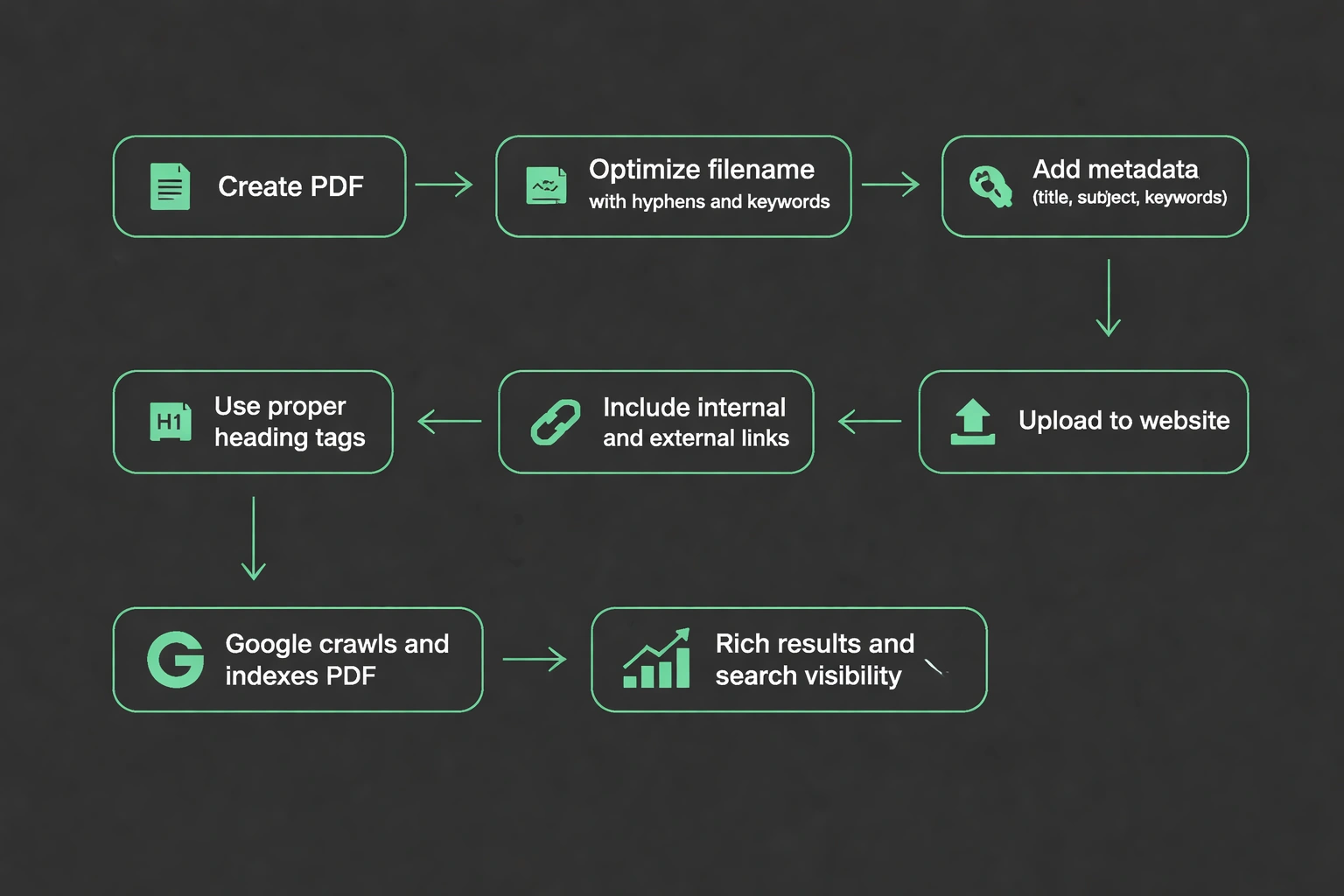
Google treats PDFs a lot like HTML pages. It crawls them, indexes them, and pulls text out of them. Search visibility for PDFs has gotten way better since 2024, too. Google now shows PDF thumbnails in results, pulls featured snippets from them, and actually recognizes the headings inside the document. Your technical whitepaper can show up as a rich result right next to standard web pages.
What actually matters for ranking a PDF? The basics: use hyphens and target keywords in the file name, fill out the metadata (title, author, subject, keywords), use actual heading tags instead of just bolding text, build backlinks to it, host it on a high-authority domain, and keep the file size under 5MB so it loads fast.
The real advantage here is permanence. Put a PDF on your domain under /resources or /guides, and it just sits there, quietly building up authority. Unlike blog posts that need constant updating to stay relevant, a well-written PDF guide can rank for years without you touching it.
How to optimize PDF files for search
PDF optimization starts before you even hit export. The source file determines most of your SEO potential, so you have to set it up right from the first draft.
Give it a descriptive filename using your target keyword. Swap spaces for hyphens and keep it under 60 characters. Something like local-seo-audit-checklist-2026.pdf tells users and search engines exactly what it is.
Use actual paragraph styles for headings (Heading 1, Heading 2) rather than just making text big and bold. Google reads this structure. Your H1 should have your primary keyword, and H2s should cover the subtopics. Fill out the metadata before saving, too. Most tools let you add title, author, subject, and keyword fields. The title becomes the blue link in search results, so write it like a meta title. The subject field works like a meta description keep it under 150 characters.
Don't forget images, either. Big images bloat the file size and slow down crawling. Compress them to 72 DPI, and add alt text in the source document. Adobe and modern design tools will carry that alt text over when you export.
Most importantly: make sure text is selectable. Never flatten a PDF into images or disable text selection for "security." If search engines can't extract the text, the PDF is invisible to them. I don't care how good the design looks if it's an image, it doesn't exist to Google.
Technical implementation: Hosting and serving PDFs
Host your PDFs on your main domain. Don't put them on third-party platforms. Putting files at yourdomain.com/resources/filename.pdf passes your domain authority to the PDF and lets you control things like response headers.
On the server side, set the right MIME type headers (application/pdf) so crawlers know what the file is. Configure Content-Disposition headers depending on whether you want the browser to suggest downloading it or viewing it inline. Enable HTTP/2 for faster delivery, since PDFs can be large. Also, compress the PDF itself rather than relying on gzip PDF streams are already compressed, so gzip doesn't do much.
I highly recommend creating landing pages for important PDFs instead of linking directly to the file. Build an HTML page at yourdomain.com/resources/local-seo-guide that describes the resource, embeds the viewer, and has a download button. You get more control over the user experience and extra ranking signals from the page content. The HTML wrapper should have a 200-300 word description of the PDF. Add structured data markup using the Article or TechArticle schema type, putting the PDF URL in the url property. Fill out headline, author, datePublished, and abstract for better rich result eligibility. And if the same PDF lives in multiple places, use canonical headers in the HTTP response to point everything to one URL.
Content strategy: What belongs in an SEO-optimized PDF
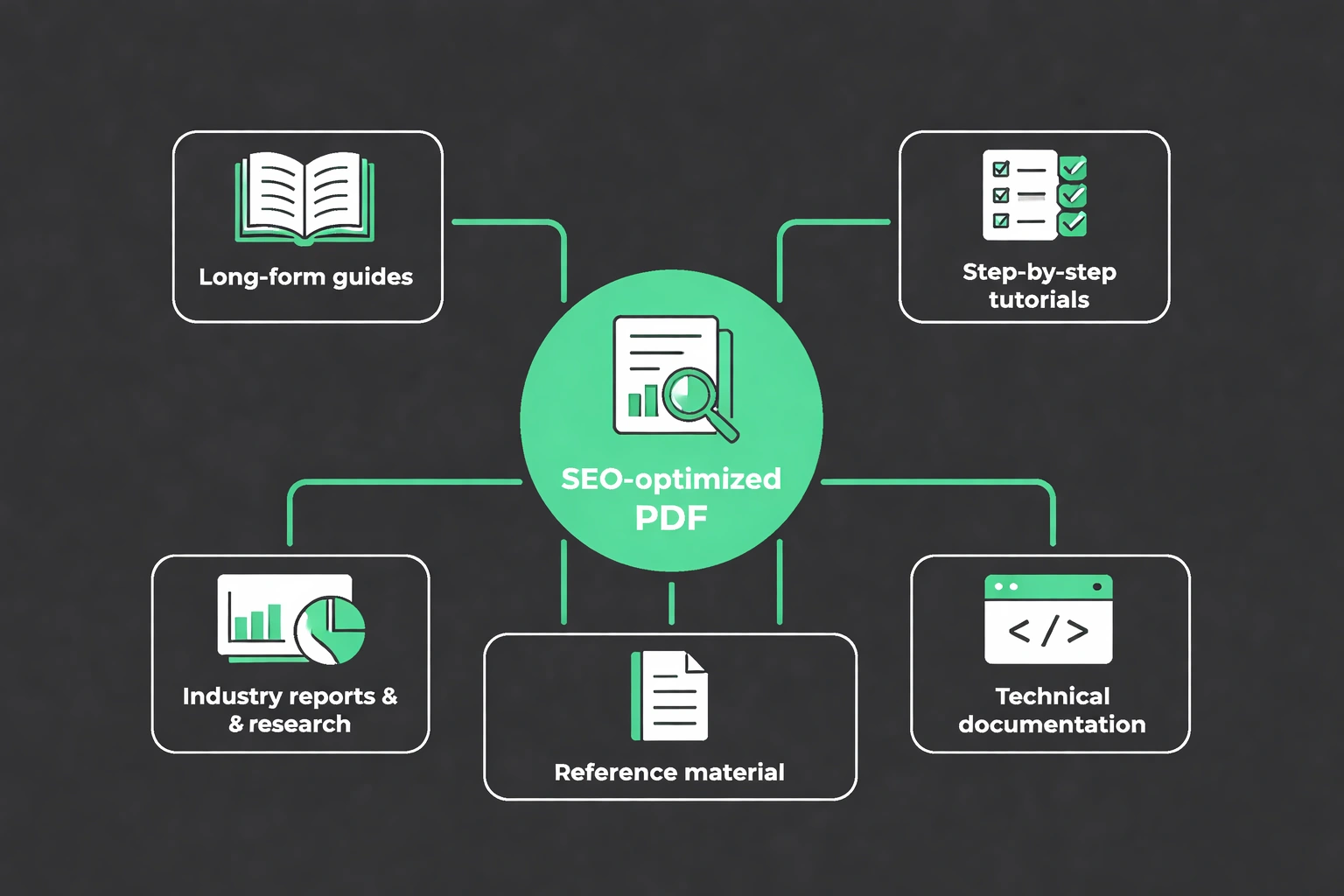
Long, comprehensive guides work best as PDFs. Multi-chapter resources that people want to save for later naturally fit the format and pull in search traffic over time. Think about topics that need step-by-step instructions, extensive documentation, or reference material people will come back to.
Industry reports and research studies are great because journalists and bloggers naturally link to good data. A "State of Local SEO 2026" report acts as link bait while ranking for hundreds of long-tail queries. Technical documentation works well too developers and enterprise clients often prefer downloading API docs and integration guides. Template libraries and worksheets solve immediate problems while catching search traffic. An "SEO Audit Checklist PDF" ranks for that exact term and generates leads. Case studies also do well, ranking for branded and industry-specific queries while helping your sales team.
Just don't publish thin content as a PDF. If it's under 1,000 words, it probably belongs on a regular web page. PDFs are best when the content is too long to comfortably read on a screen in one sitting.
Linking strategy: Building authority for PDF assets
Internal linking to PDFs works a lot like linking between pages, but there's a catch: PDFs can't pass PageRank back to your site. That makes your inbound link architecture critical.
Link to your important PDFs from high-authority pages. If you published a local SEO guide, link to it from your local SEO audit tools article and your local search optimization guide. Use descriptive anchor text with your target keywords.
Reference PDFs inside blog posts as downloadable resources, too. When you write about a complex topic, offering a "download the complete guide" link creates a natural funnel from informational content to lead capture. You should also include PDFs in your content calendar as pillar assets. Plan blog posts that support your major PDF guides, building a hub-and-spoke structure where the PDF is the authority.
Cross-promote related PDFs inside each document. Even though PDFs can't pass PageRank, they can have clickable links. Add a "Related Resources" section in the footer linking to blog posts and other guides. For external links, you have to do active outreach. Share the PDF with industry publications, submit it to directories, and pitch it to journalists. One good link from a trade publication can drive sustained traffic and boost rankings.
Measuring PDF SEO performance
You can track PDF performance through a few different analytics layers. Google Search Console separates impressions and clicks for PDF URLs from HTML pages, which makes it easy to isolate the data.
Search impressions tell you how often the PDF shows up. Compare this over time to see if your optimizations are working. PDFs usually grow impressions slower than pages, but they hold onto traffic longer. Click-through rate shows if your title and description are working. If you get impressions but no clicks, your metadata probably needs work. Download completion rates show engagement if people click through but don't download, either your landing page doesn't sell the value or the file size is too big.
I also like tracking time from publication to ranking. A well-optimized PDF with good internal links usually ranks in 2-3 weeks. If it takes longer, you probably have technical issues or lack topical authority. Finally, use AI citation tracking to see if language models are pulling from your PDF. LLMs increasingly use authoritative PDFs as sources, which extends your reach beyond standard search.
Common PDF SEO mistakes
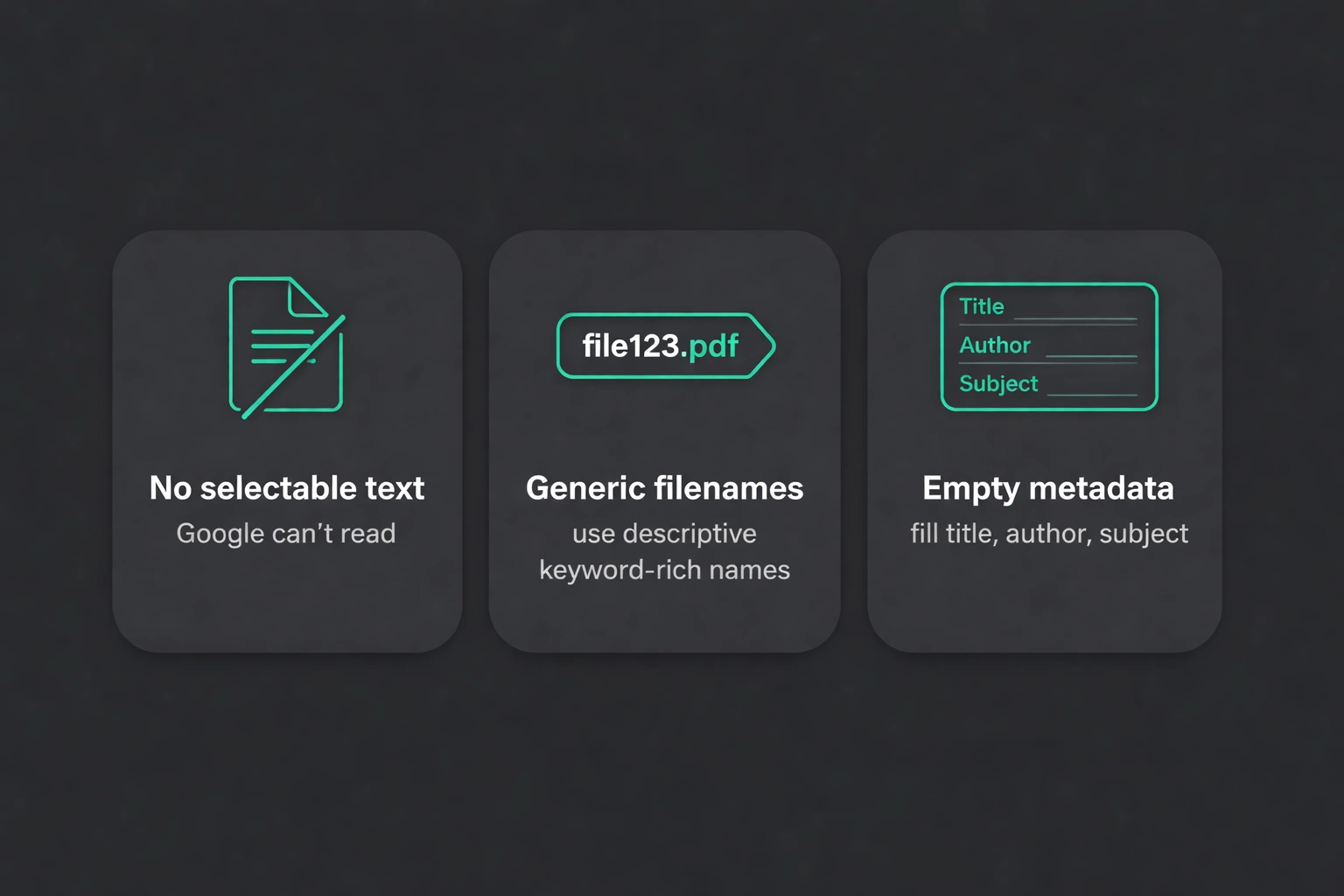
The biggest mistake by far is flattening a PDF so there's no text layer. If you can't select and copy the text, Google can't read it. Always save PDFs with embedded fonts and selectable text.
Generic filenames like "whitepaper.pdf" or "guide-final-v2.pdf" are a waste. Every filename should describe the content and include a keyword. This goes for internal documents too, because you never know when you'll want to publish them publicly. Leaving metadata fields empty forces search engines to guess what your document is about. Fill out the title, author, and subject fields. These show up in search results and directly affect your click-through rate.
A few other things to watch out for: Blocking PDFs in robots.txt stops indexing entirely. Unless you have a privacy issue, let search engines crawl them. Hosting PDFs on a subdomain (like resources.yourdomain.com/guide.pdf) dilutes your ranking power. Keep them on the main domain (yourdomain.com/resources/guide.pdf). And don't just publish a PDF and walk away. Even a perfectly optimized file needs a launch campaign email outreach, social sharing, and internal links from high-traffic pages to start ranking.
Integrating PDFs into your content architecture
PDFs work best when they're connected to the rest of your content, not just sitting in isolation. Cross-reference them, repurpose them, and tie them into your blog strategy.
Try extracting key sections from a big PDF and publishing them as standalone blog posts. A 30-page local SEO guide can become six separate articles, each linking back to the full PDF. This expands your keyword coverage and creates multiple entry points. You can also use PDFs as content upgrades. When someone reads your local SEO factors post, offer a downloadable PDF checklist as the next step. It turns readers into leads and builds backlinks to the PDF.
Reference your PDFs in your automatic internal linking strategy. Your linking algorithms should treat authoritative PDFs as high-value targets. You can also build content series that end in a PDF. Publish weekly blog posts on a topic, then compile and expand them into an ultimate guide. It builds anticipation and creates a solid linkable asset. You can even use your AI blog generator to create supporting content around your PDFs. Generate outlines that answer specific questions your PDF covers, making sure you have solid topical coverage.
Advanced tactics: PDFs in programmatic SEO
Programmatic PDF generation is a way to build scalable content for location-based or product-specific searches. This works really well if you're a service business with multiple locations or a SaaS company with a ton of features. You can automatically generate location-specific guides by combining templates with local data. A PDF called "Complete SEO Guide for Miami Restaurants 2026" targets very specific search intent. And if you're doing this for 100+ cities, it requires very little manual work.
Build a master template with placeholder fields. Design the structure once, then plug in the location name, local stats, market-specific examples, and regional case studies. Use programmatic SEO principles to generate unique metadata for each version. The titles, descriptions, and even some content sections should adapt to local keywords. Just keep your quality thresholds high. Each PDF needs to actually be useful. Don't just find-and-replace city names in thin content. Include real local data and market insights that make the separate resource worth it. If you do it right, a single template can produce hundreds of local resources that rank for long-tail queries.
Future-proofing your PDF SEO strategy
Search engines keep changing how they handle non-HTML content. A few trends will shape PDF optimization moving forward.
AI extraction is getting better. Large language models parse PDFs more effectively than traditional crawlers. Make sure your PDFs have clear section breaks, logical flow, and semantic headings so AI can understand them. Think about how your content might be cited by AI search engines and structure it accordingly.
Multimedia PDFs are also a thing now you can embed video, audio, and interactive elements. These improve the user experience, but make sure the core content is still text so it can be crawled. Add transcripts and text descriptions for any multimedia. Mobile matters too. PDFs aren't responsive like HTML, but people still open them on phones. Keep file sizes down for cellular connections and make sure the text is readable without endless zooming.
Connect your PDF strategy to your broader content infrastructure using platforms like LeafPad. Tools like this help you keep web content and downloadable resources consistent without doing it all manually.
The real value of PDF SEO is creating assets that hold their worth over time. Blog posts demand constant updating to keep their rankings, but a solid PDF guide can bring in traffic for years with almost no maintenance. For 2026, that makes it one of the best content investments you can make.
Published with LeafPad